Call Screening Explained — What It Is, How It Works, When You Need It
The FCC doesn't use the phrase "call screening." Its rules, under CG Docket No. 17-59, talk about blocking and labeling, two sharply defined mechanisms. "Screening" is a consumer-marketing word, and every vendor who uses it has given it a different meaning.
Three examples, all shipping right now, all calling themselves screening:
- Apple's Silence Unknown Callers screens by suppressing the ring.
- Hiya's free tier screens by labeling the number.
- Google's Pixel Call Screen screens by having an AI answer the call.
None of the three works the same way as the others, and none is wrong; they solve different parts of the same problem. But if you don't know which one your phone is doing right now, you can't tell whether it's doing what you think.
The four approaches all called "screening"
Start with the four that are already on your phone, or one tap away in an app store.
1. Silence the ring, send to voicemail. Apple's Silence Unknown Callers is the cleanest example. Flip the switch in Settings → Phone, and calls from anyone not in your Contacts, Recents, or Siri Suggestions don't ring. They land in Recents and voicemail, and that's all. Apple's own support page is direct about the tradeoff: "a caller must be listed in your Contacts or Recents … in order for their call to go through." A new doctor's office calling for the first time, a delivery driver with the wrong address, a school calling from a backup line: all silenced, by design. This mechanism works well if your real circle is locked into Contacts and you almost never get legitimate unknown calls.
2. Label the number, still ring. Free Hiya, carrier Caller ID & Spam, Samsung Smart Call, Google's built-in spam labeling. The phone looks up the incoming number in an analytics database, tags calls it recognizes as spam, and the phone rings anyway with "Spam Likely" on the screen. The FCC's 2019 Declaratory Ruling (part of the same CG 17-59 docket) is why labeling exists as its own category: providers got permission to block by default, and many chose to label instead, since labeling carries less liability for a wrong call. Label accuracy depends on user reports reaching the analytics partner. The big three partners (Hiya, First Orion, TNS) don't operate a unified appeals system. When a small business or sole proprietor ends up labeled as spam, clearing it involves filing separately with each partner.
3. Block based on a database match. Robokiller, Truecaller Premium's Auto-Block, Hiya Premium, T-Mobile Scam Shield's Scam Block (which happens at the network, so the phone literally never rings), AT&T ActiveArmor, Verizon Call Filter Plus. The mechanism is the same as labeling, but with a different ending: match the database, drop the call. When the database is right, it's clean. When the database is wrong, the block is silent. No ring, no voicemail, no missed-call notification. The person trying to reach you has to know you and find another way to tell you the call didn't go through. Robokiller runs a public Blocklist Exception form for exactly this reason. On Trustpilot and PissedConsumer, users have posted cases of Robokiller blocking a sister, a doctor, and a father's hospice nurse. Hiya publishes its own support article titled "Help! My Numbers are Being Flagged as Spam, but My Calls are Legitimate." These aren't hypothetical failure modes; they're common enough that the vendors themselves operate intake processes for them.
4. An AI answers on your behalf. This category grew up fast in the last year. Pixel Call Screen has been around for a while (free on supported Pixels in the US, with manual screening in a handful of other countries), but two big launches in January 2025 reshaped the space. Hiya AI Phone launched on 28 January 2025, a separate app from the spam blocker, where the AI picks up unknown calls, asks the caller to state name and purpose, evaluates whether to connect, and runs live scam and deepfake-voice detection during the call. Premium is $9.99 a month. Truecaller Assistant is Truecaller's version on Android, bundled with Truecaller Premium. All three work the same way from the user's perspective: the phone doesn't ring in the normal sense. An AI is on the call. You see a live transcript of what the caller is saying. You can pick up, hang up, or let it play out.
One smaller but important change in the same window: iOS 18.2 added a new IdentityLookup Live Caller ID Lookup API. On 22 January 2025, Truecaller became the first global app to use it. iPhone users running a current iOS can now get real-time caller identification in the native Phone app: Truecaller sends encrypted lookups from Apple's Phone app to its servers and decrypts the result client-side, without Truecaller ever owning the call itself. That's identification rather than screening (nothing decides what happens to the call), but the name on screen often feeds your decision to answer.
The fifth approach: the caller has to prove themselves
All four approaches above share an assumption: either you decide before answering, based on a label or a ring that never happens, or an AI takes the whole call for you. Challenge-response puts the decision inside the call itself, and it pushes the cost of getting through onto the caller.
VoxGuard is the challenge-response version I can describe accurately, because we built it. Here's how it works mechanically:
- An unknown number dials. The call routes to VoxGuard's server via conditional call forwarding, which the app walks you through setting up once during onboarding (carrier-specific dial codes, MMI syntax, the app shows you the exact sequence).
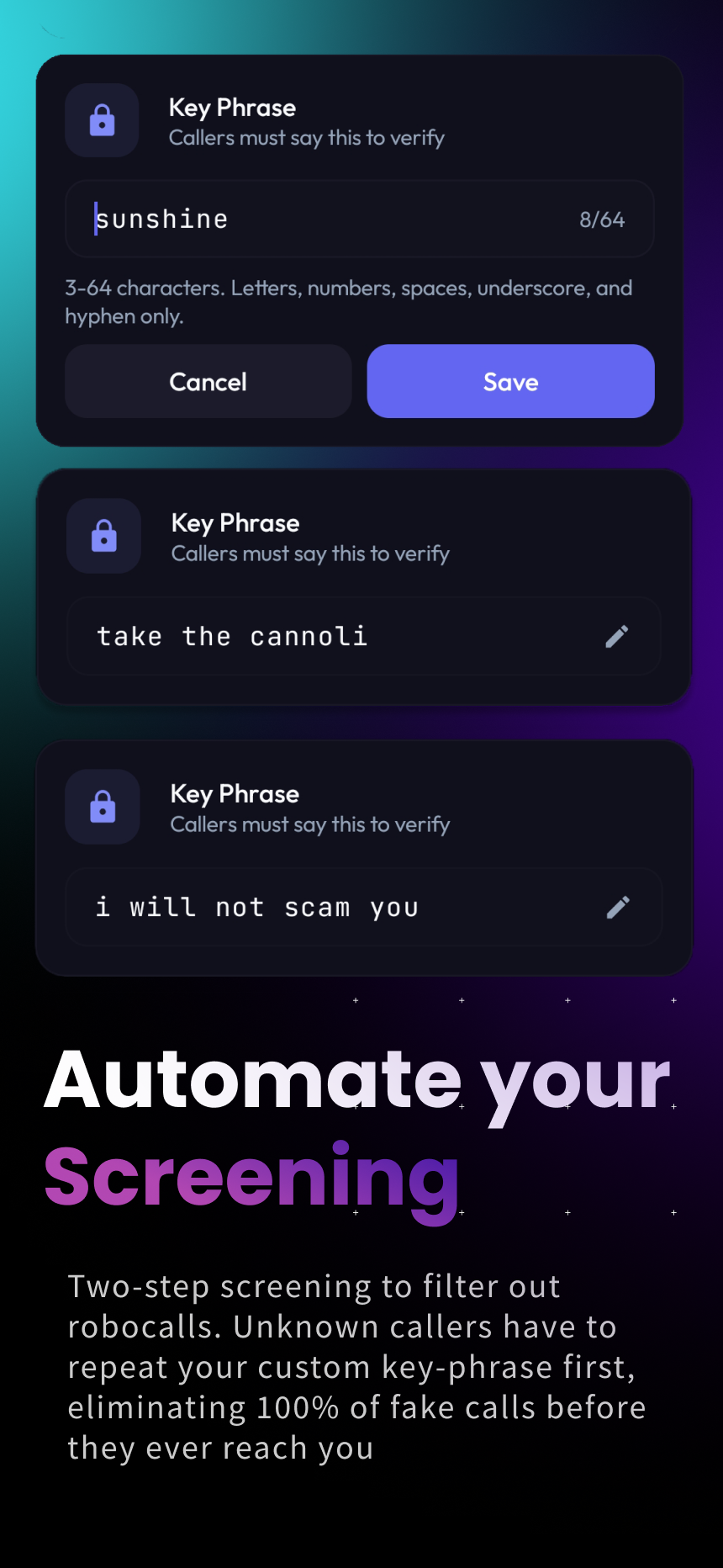
- VoxGuard answers and plays a short prompt: "Please say {phrase}." The phrase is one you picked during setup, up to 64 characters and multi-word, and the app speaks it aloud for the caller to repeat back.
- The caller repeats the phrase back. That single step sorts most of the modern spam categories out before they reach you. Robocalls are recordings, not interactive systems; they can't parse and comply with a live audio instruction. Bulk live-scam operators could theoretically comply, but repeating a random phrase breaks the throughput economics their business runs on, so they drop. Silent-hangup dialers never intended to speak in the first place; they're there to confirm a real line answered. AI voice scams running scripted playbooks aren't built to react to a live prompt in real time.
- If the phrase lands, VoxGuard asks the caller to state their name and reason, and records it.
- The recording is transcribed asynchronously. You get a heads-up notification on the lock screen with the audio clip and, once it's ready, the transcript. You have two minutes to Approve or Decline. Approve connects the caller through to your phone via SIP REFER, with the caller's real number on your screen. Decline sends the caller to voicemail.
The filter criterion is behavioral, not reputational.
Notice there's no database involved. A brand-new scam number that's been in service for 20 minutes gets the same treatment as a number that's been on reputation lists for a decade: both have to pass the phrase step, and there's no window where a fresh number gets through because the analytics partners haven't caught up yet.
Unknown first-time callers aren't silenced, either. A new doctor calling from a line you've never seen, a contractor following up on a quote, a school office dialing from a backup number: if there's a real person on the other end who can repeat a sentence, they make it through. The filter criterion is behavioral, not reputational.
The phrase being customizable is doing quieter work. If every user had the same one, a scammer could record one compliant response once and blast it across the whole userbase. Letting each user pick their own closes that pre-recorded workaround.
Which approach matches your phone life
There's no universal right answer. Match the mechanism to how you actually use your phone.
- If you almost never get unknown calls, and the handful you do get are nuisance, iOS Silence Unknown Callers is nearly free behavior for you. Turn it on, cost-to-you is zero.
- If you get a lot of spam and almost never a legitimate first-time call, database blocking (Scam Shield, Call Filter Plus, Robokiller, Truecaller Premium) covers the common case. The cost is the silent false positive: the day a real call does come from an unknown number, nothing tells you it was blocked.
- If you regularly get legitimate first-time unknowns (small-business owners, parents whose kids' schools call from changing numbers, anyone who deals with medical offices, contractors, deliveries, home services), database blocking silently works against you, and labeling is a suggestion the phone rings through anyway. AI answering (Pixel Call Screen, Hiya AI Phone) handles this case, and so does challenge-response.
- If you specifically want the filter to be the caller's effort rather than your phone's guess about a number, challenge-response. The criterion becomes "will this caller spend ten seconds interacting with a prompt," which sorts categories of caller, not specific numbers.
What VoxGuard does, and what it doesn't
The honest scope, so you can tell whether it fits your situation.
VoxGuard runs the challenge-response flow end to end on Android. Every caller who passes gets their reason recorded as audio and transcribed. Device contacts are synced so that known people ring through without screening; the app reads phone numbers only, no names, photos, or other contact fields. The decision window on an incoming call is two minutes.
- Android only. No iOS version yet.
- US and Canada only. The telephony path runs through North American inbound infrastructure, so numbers and forwarding outside the US and Canada aren't supported today.
- Not one-tap. Conditional call forwarding has to be set up once on your carrier. The app walks you through the exact dial codes, but it's a real setup step, not an install-and-done.
Each screening approach is a trade. The VoxGuard trade is: set up forwarding once, and in exchange, unknown callers carry the cost of being heard, not you.
The setting you didn't choose
Your phone is already doing one of these five things right now. You didn't pick it; it was set by the combination of your device, your carrier, and whatever apps were preinstalled. Most people find out which one only when the wrong call gets through or the right one doesn't. Every phone is screening somehow; the choice worth making on purpose is which kind you're willing to live with.
Sources
- FCC — Call Blocking Tools and Resources
- FCC — Report on Call Blocking, CG Docket 17-59
- Apple — Manage unknown callers on iPhone
- Apple — Screen and block calls on iPhone
- Apple — Set up Voicemail on iPhone (Live Voicemail)
- Google — Screen your calls before you answer them
- Google — Pixel Call Assist
- Hiya — Spam Blocker app
- Hiya — AI Phone press release, 28 Jan 2025
- Hiya — iPhone FAQ
- MacRumors — Truecaller iOS Live Caller ID, 22 Jan 2025
- AT&T — ActiveArmor
- T-Mobile — Scam Shield
- Verizon — Call Filter