Is There an App That Answers Calls and Asks Who's Calling? Yes, Here's How It Works
Yes, and if you've typed some version of this question into a search bar, you've probably noticed the answer is strangely hard to find. So here it is up front. The category is called call screening, and the good versions work like this: the app answers unknown numbers before your phone ever rings, asks the caller to prove there's a real person on the line, and then has them say who they are and why they're calling. You get their answer as a recording and a transcript, and you decide whether to take the call. Anyone already in your contacts skips all of it and rings through like normal.
That's the short answer. The rest of this post is what you'd want to know before installing anything: whether your phone already has a version of this built in (it might, with real caveats), what an unknown caller actually experiences (worth knowing, because your mother will hear it too), and how much of the spam actually gets stopped, measured on our own network rather than estimated.
Your phone might already have a version of this
Both platforms have been building toward this idea, and it's worth knowing exactly what you already own before you install anything.
On iPhone, iOS 26 added Call Screening to the Phone app. Turn on "Ask Reason for Calling" and unknown callers get answered automatically, asked for their name and the reason they're calling, and held while your phone rings with a transcript of whatever they said. It's a real version of the idea, built into the OS, and if your iPhone is updated you should absolutely know it's there.
On Android, the picture depends heavily on which phone you're holding. Google's Call Screen does the same job on Pixels, and in automatic mode it can hang up on detected spam without bothering you at all, though automatic screening runs on US Pixels only. Samsung shipped its own AI call screening on the Galaxy S26 and has been rolling it to the S25 line since May 2026, with the S24 series and foldables next. And that's roughly where the built-in list ends, on both platforms. A Galaxy A-series, a Motorola, a OnePlus, an Android more than a couple of years old, or an iPhone that can't take iOS 26: no built-in screening, and no update coming that changes it. For the wider map of everything sold as "call screening," from labels to blockers to AI assistants, we broke that down separately.
But here's the part that matters even if your phone made the list, and it's the reason people who already have these features still go looking for something better.
The built-ins don't really take the call off your hands. Apple's version rings you almost immediately, the moment the caller says anything at all (MacRumors confirmed that even a bare "hello" does it), and then you're watching the transcript scroll while the caller waits on the line, reading in real time, deciding under pressure. Pixel's manual mode puts you in the same posture. People I know who've tried the iPhone version describe it less as screening and more as a live feed of the interruption: the call still happens to you, right now, only with subtitles. And the automated modes have edges of their own; Google is candid that automatic Call Screen won't run while roaming, doesn't work with call forwarding, and that "not all spam calls and robocalls can be detected."
A question is free to answer.
There's a deeper problem underneath the annoyance: the gate these features use is a question. Who are you, and why are you calling? "Hi, this is Sarah from the clinic, calling about your appointment" costs a scam operator nothing to say, and saying things like that convincingly is their entire job. A gate the caller can pass by saying words, any words, filters out nothing that can speak.
The screening that holds up does two things differently. It makes the caller do something rather than just say something, and it hands you the result on your schedule instead of pulling you into the call while it happens. That's the design we build.
Screening that lives in the network instead of the phone
VoxGuard is an Android app today, but the screening itself doesn't happen on the phone at all. It rides on conditional call forwarding, a plumbing feature nearly every US and Canadian carrier supports: when an unknown number calls, the call diverts to VoxGuard's servers before your phone gets involved. Because the mechanism lives in the phone network rather than in the handset's software, it doesn't care what you're holding. A Galaxy S9 gets the same screening as an S26, no flagship required. The honest carve-out sits on the carrier side, not the phone side: a few carriers don't offer conditional forwarding at all (as of August 2026: Google Fi, TextNow, and Canada's Lucky Mobile), and VoxGuard can't screen calls on those.
And the gate is a task, not a question. Here's what that looks like from both sides of the call.
What the caller hears, and what you see
Say a number you've never seen calls you on a Tuesday afternoon. Instead of ringing, the call lands on VoxGuard, which answers and plays an announcement: "This call is protected and recorded by VoxGuard. To proceed, please say [your phrase]." The phrase is one you chose during setup; the app speaks it aloud, and the caller's job is to repeat it back. They get three tries.
This one step clears most of the field. A robocall is a recording, so it can't hear an instruction; it talks over the prompt until its attempts run out. The silent dialers that call just to confirm your line is real are waiting to hear a human say hello, so a prompt reads as a dead end and they drop. And a caller who does repeat the phrase has just done something no script and no recording can do on its own: listened, processed, and responded. A real person passes this a little puzzled, but they pass.
Whoever gets through is then asked to say their name and the reason for their call, in their own voice, in up to a minute. That statement is recorded and transcribed, and your phone lights up with the result: the number, the audio, the text.
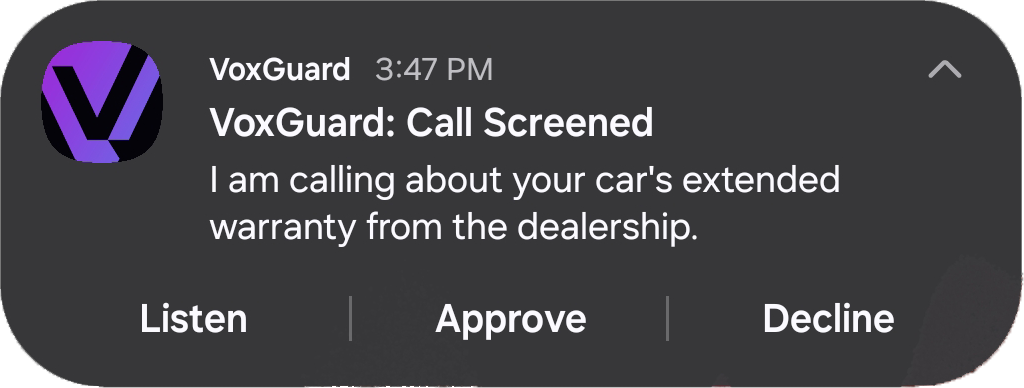
From the lock screen you can listen, approve, or decline. Approve, and the call connects normally, showing the caller's real number. Decline, or just let the two-minute window lapse because you're driving, and the caller lands in your VoxGuard voicemail, where anything they leave also gets transcribed for you.
Your saved contacts never touch any of this. The app reads the phone numbers in your contacts (numbers only, nothing else), so the people you know ring through on every call, unscreened.
The setup has one honest chore in it: conditional forwarding has to be switched on once, and the app walks you through the exact steps for your carrier. After that, the screening does its work without asking anything of you, which was the point all along.
What actually gets through
We don't have to guess at this part, because we run the servers. Across more than 1,400 real screened calls on the VoxGuard network as of June 2026, 87% of unknown callers never made it past the screening challenge. They failed the spoken phrase, ran out of attempts, gave no reason for calling, or hung up the moment they heard a prompt. Barely one in eight unknown callers could do the thing a legitimate caller does without thinking: say who they are and why they're calling.
The economics explain the number. A recorded call can't process a repeat-after-me instruction at any price. And a bulk operation paid on volume loses money the moment a call demands fifteen extra seconds, so the rational move is to hang up and dial the next number on the list. The design turns the spammer's own business model into your filter.
The callers who do get through are the ones you actually wanted: the new doctor's office, the school calling from a substitute line, the recruiter, the contractor finally returning your quote. A real person with a real reason passes in about fifteen seconds, and you hear that reason before your phone makes a sound.
Real inbound calls to VoxGuard-protected numbers as of June 2026; test and preview calls excluded. "Never made it past the screening challenge" means the caller failed the spoken challenge, exhausted three attempts, provided no reason for calling, or hung up at the prompt.
VoxGuard runs on any Android phone, on nearly every US and Canadian carrier (the short exception list above), for $4.99/month with a 7-day free trial. Get it on Google Play, or watch the screening flow end to end first.
Sources
- Apple. Screen and block calls on iPhone. Accessed July 2026.
- MacRumors. Get Your iPhone to Ask Callers Who They Are Before You Answer.
- U.S. PIRG Education Fund. Call screening in iPhone iOS 26: Nice effort to combat robocalls, but...
- Google. Screen your calls before you answer them. Accessed July 2026.
- Droid Life. Samsung One UI 8.5 Updates Land in US on Galaxy S25, Galaxy Z Fold 7. May 11, 2026.
- Android Authority. Samsung starts rolling out stable One UI 8.5 to Galaxy S25 users in the US.
- VoxGuard network data. Outcome distribution across 1,423 real inbound screened calls, measured June 2026. Methodology above.